Subassembly Editing

Subassembly Editing

Anonymous
Not applicable
2,064 Views
4 Replies
Message 1 of 5

Subassembly Editing

Anonymous
Not applicable

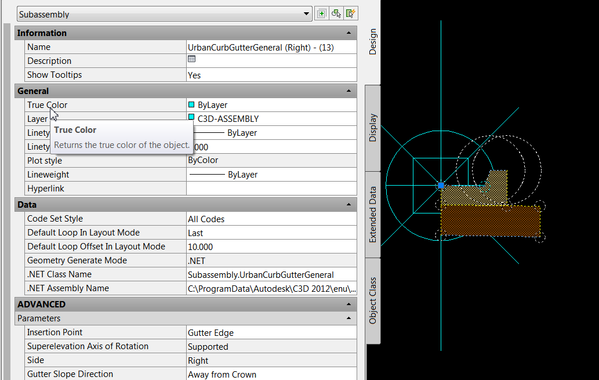
I modified the UrbanCurbGutterGeneral subassembly that comes with C3D2013 to match our local standards.  Came out great and is working.  I copied the Subassebmly, made my edits and renamed it "G-2".  My problem is that when I select the subassembly in the drawing, the properties box still shows it as "UrbanCurbGutterGeneral".  Why is it showing as one name on by Tool Palettes and a different name in the drawing??


See image.

0 Likes
Accepted solutions (1)
2,065 Views
4 Replies
Replies (4)
Message 2 of 5

mathewkol
Advisor
Advisor
You need to copy the sub and paste it to a NEW custom tool palette and not into the original one like you have done.
Matt Kolberg
SolidCAD Professional Services
http://www.solidcad.ca /
0 Likes
Message 3 of 5

Anonymous
Not applicable

How did you open the subassembly file, What program?. I was under the impression that Subassembly Composer can't open the stock subassemblies.

I have been tiring for weeks to get a modified Gravel Road subassembly to work with SuperElevation properly. It works on a flat area but the shoulder slopes change and the ditch depths change when in superelevated region. I am very new to Subassembly Composer and would like to be able to open the existing Road and Shoulder subassemblies to see how they are configured to accept the Superelevation requirements.


Thanks for any help in advance


Don

0 Likes
Message 4 of 5

Anonymous
Not applicable

Thanks for your reply.  I just cut/pasted saved it over to a custom pallate, as suggested, and renamed the subassembly.  I did a test and attached it to one of my assemblies.  If I next select the curb it still shows up in my properties as named "UrbanCurbAndGutter".

0 Likes
Message 5 of 5

mathewkol
Advisor
Advisor
Accepted solution

Ok, I think I know what you're doing.  You get this right?  The "Name" still says Urban Curb...?


This is normal and you can't change it.  When you copy a tool palette tool, you're renaming the tool, not the subassembly.  You'd need to edit the .NET code to change the name of it.  Short answer is you can't do it without lots of unnecessary work.


1.png

Matt Kolberg
SolidCAD Professional Services
http://www.solidcad.ca /