Setting up custom coordinate system for COGO points

Setting up custom coordinate system for COGO points

Anonymous
Not applicable
2,627 Views
4 Replies
Message 1 of 5

Setting up custom coordinate system for COGO points

Anonymous
Not applicable

Hi!

I have a small field (5 by 5 meters) to be set out with about 40 points. Currently i use EOV (Hungarian National Coordinate System), thus each point has a lot of digits. I want to make the implemetor's job easier, so i want to move and rotate the CS near to my field.

I tried to use UCS, but the COGO points retained the "World" coordinates.

Do you have any idea how to carry out this without moving my whole drawing to the origin?

Thanks!


0 Likes
Accepted solutions (1)
2,628 Views
4 Replies
Replies (4)
Message 2 of 5

mathewkol
Advisor
Advisor
You can truncate the coordinates.
http://www.civil4d.com/2008/01/truncs-arent-just-for-elephants/
Matt Kolberg
SolidCAD Professional Services
http://www.solidcad.ca /
0 Likes
Message 3 of 5

Anonymous
Not applicable

Thanks, Matt!

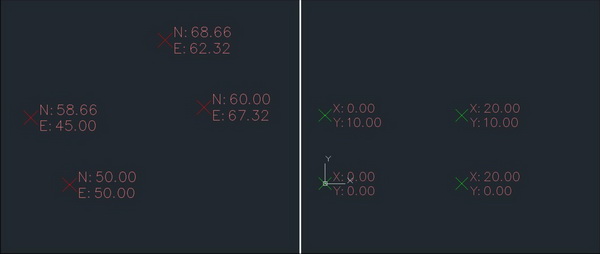
It is a perfect solution for truncating the digits, but i would like to rotate the CS as well, as it is shown below.

I think it can be solved with trigonometric functions, but isn't there an easier way?


Survey.jpg

0 Likes
Message 4 of 5

ctbailey
Advocate
Advocate
Accepted solution

I think this is a perfect example of a use for the "Transformation" tab found in Drawing -> settings.


We don't really want to MOVE or ROTATE the points, we just want to change the display of the points.


I would look into the Transformation tab, and then revise some of the labels to use the "grid" coordinates, instead of the "local" coordinates.

_______
Craig T. Bailey, PE, LLS, PSM
Bailey Associates
www.bailey-associates.com
Message 5 of 5

Anonymous
Not applicable

I tried to use the Transformation before but i didn' know about the grid coordinates.

Now it works perfectly! Thanks!

0 Likes