cannot find wrapper - c3d 2011 64 - needing COM

cannot find wrapper - c3d 2011 64 - needing COM

Anonymous
Not applicable
2,576 Views
10 Replies
Message 1 of 11

cannot find wrapper - c3d 2011 64 - needing COM

Anonymous
Not applicable

Greetings,

C3D 2011. 64 bit. sp1 and sp2 installed

windows 7 enterprise 64

csharp 2010 express


no problems referencing managed dot net libraries; already developed some working solutions

now I need to reference the COM libraries

when I try to reference the AEC Base 6.5 Application Library (program files ........ aecxuibase65.tlb) the response is error:

cannot find wrapper assemby ...


I have tried a couple of suggestions so far

1 - the registry edit from the api training session

2 - downloading the object arx sdk and referencing x64 dll's from there


but I still get the same error.

any ideas? thx... have a great day...


0 Likes
2,577 Views
10 Replies
Replies (10)
Message 2 of 11

andrewpuller3811
Advisor
Advisor

I had the exact same problem just recently, and through a lot of referencing/unreferencing I somehow got it to work.


Sorry didn't document the step that worked. 😞


Just had a look through the .vbproj file which made me remember that I made a new project from scratch, and used the Object ARX references \Object ARX 2011\inc\AcDbMgd.dll   \Object ARX 2011\inc\AcMgd.dll and then the usual references to C:\Program Files\Autodesk\AutoCAD Civil 3D 2011\AeccDbMgd.dll and C:\Program Files\Autodesk\AutoCAD Civil 3D 2011\AecBaseMgd.dll 


I also browsed to the files acax18ENU.tlb and axdb18enu.tlb in the \objectARX 2011\inc-x64 folder.

For the civil com libraries I browsed to the files AecXBase65.tlb and AecXUIBase65.tlb in the folder C:\Program Files\Common Files\Autodesk Shared  and  AeccXLand.tlb and AeccXUiLand.tlb in C:\Program Files\Common Files\Autodesk Shared\Civil Engineering 80


This seemed to allow the AecXUIBase65.tlb reference to work.


I then copied this project and imported all the existing forms and modules.


Long winded way of getting it to work, but was ready for anything after days of the same problem.


Maybe just unreferencing and rereferencing like above might work.


Hope this helps, or someone comes up with a better solution.


If a post provides a fix for your issue, click on "Accept as Solution" to help other users find solutions to problems they might have that are similar to yours.

Andrew Puller
Maitland, NSW, Australia
Windows 11
Intel core i7 11800 @ 2.30 GHz with 32GB Ram
Civil 3d 2023
0 Likes
Message 3 of 11

Anonymous
Not applicable

thx Andy ... I will give it a bash just now.. at least I am not alone, so it makes me feel a little better...

0 Likes
Message 4 of 11

JamesMaeding
Advisor
Advisor

I'm getting same error on C3D 2012.

I have a sub support case going, so anyone with suggestions besides reinstall, pls chime in.


What was the reg fix suggested in the api training?

thx


internal protected virtual unsafe Human() : mostlyHarmless
I'm just here for the Shelties

0 Likes
Message 5 of 11

Jeff_M
Consultant
Consultant

James, if you have applied Update 1 for C3D2012 then you need to apply a registry fix. I've attached it to this message.

Jeff_M, also a frequent Swamper
EESignature
Message 6 of 11

JamesMaeding
Advisor
Advisor

worked perfect.

I had a feeling it was something to do with the .107 and .49 version numbers I was seeing pop up here and there.

Saved again by the Mishler!


internal protected virtual unsafe Human() : mostlyHarmless
I'm just here for the Shelties

0 Likes
Message 7 of 11

Anonymous
Not applicable

I know this is an ancient thread, but I'm having a similar problem with loading these .dll files for a C3D 2014 project. Would the attached registry fix still work for this issue?


Thanks!

0 Likes
Message 8 of 11

Jeff_M
Consultant
Consultant

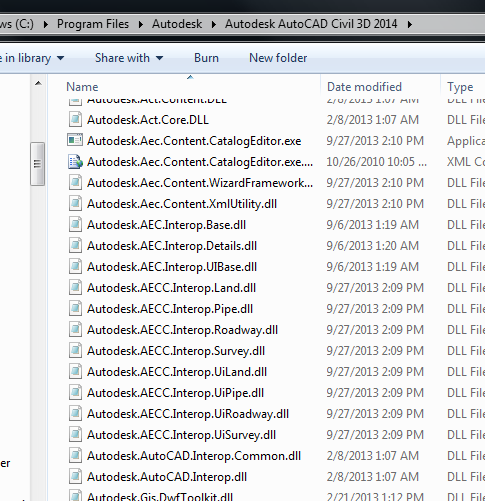
Make sure you are loading the COM Interop dll's from the C3D Install folder and NOT from the Common folder.


Interops for 2014.png

Jeff_M, also a frequent Swamper
EESignature
Message 9 of 11

Anonymous
Not applicable

Sorry, I'm a bit naive...which folders are you referring to?

0 Likes
Message 10 of 11

Anonymous
Not applicable

C:\Program Files\Autodesk\Autodesk AutoCAD Civil 3D 2014


Here is a useful link


 http://adndevblog.typepad.com/infrastructure/2012/04/com-references-on-civil-3d-2013.html


Cheers,

Partha


Message 11 of 11

Anonymous
Not applicable

Oops...I think I actually posted to the wrong ancient thread...but I think I'm OK now anyway. I was actually having an error loading AecXBase.dll but I think I might not need it.


Thanks for the replies and for the link...looks like there are some posts on that blog I might want to look at for help in the future.

0 Likes