Community
- Forums Home
- >
- AutoCAD Architecture Community
- >
- AutoCAD Architecture Customization forum
- >
- Property Set Definition Integer value
AutoCAD Architecture Customization
Welcome to Autodesk’s AutoCAD Architecture Customization Forums. Share your knowledge, ask questions, and explore popular AutoCAD Architecture Customization topics.
Turn on suggestions
Auto-suggest helps you quickly narrow down your search results by suggesting possible matches as you type.
 This page has been translated for your convenience with an automatic translation service. This is not an official translation and may contain errors and inaccurate translations. Autodesk does not warrant, either expressly or implied, the accuracy, reliability or completeness of the information translated by the machine translation service and will not be liable for damages or losses caused by the trust placed in the translation service.
Translate
This page has been translated for your convenience with an automatic translation service. This is not an official translation and may contain errors and inaccurate translations. Autodesk does not warrant, either expressly or implied, the accuracy, reliability or completeness of the information translated by the machine translation service and will not be liable for damages or losses caused by the trust placed in the translation service.
Translate
Reply
Topic Options
- Subscribe to RSS Feed
- Mark Topic as New
- Mark Topic as Read
- Float this Topic for Current User
- Bookmark
- Subscribe
- Printer Friendly Page
Message 1 of 3


08-22-2012
01:18 PM
- Mark as New
- Bookmark
- Subscribe
- Mute
- Subscribe to RSS Feed
- Permalink
- Report
08-22-2012
01:18 PM
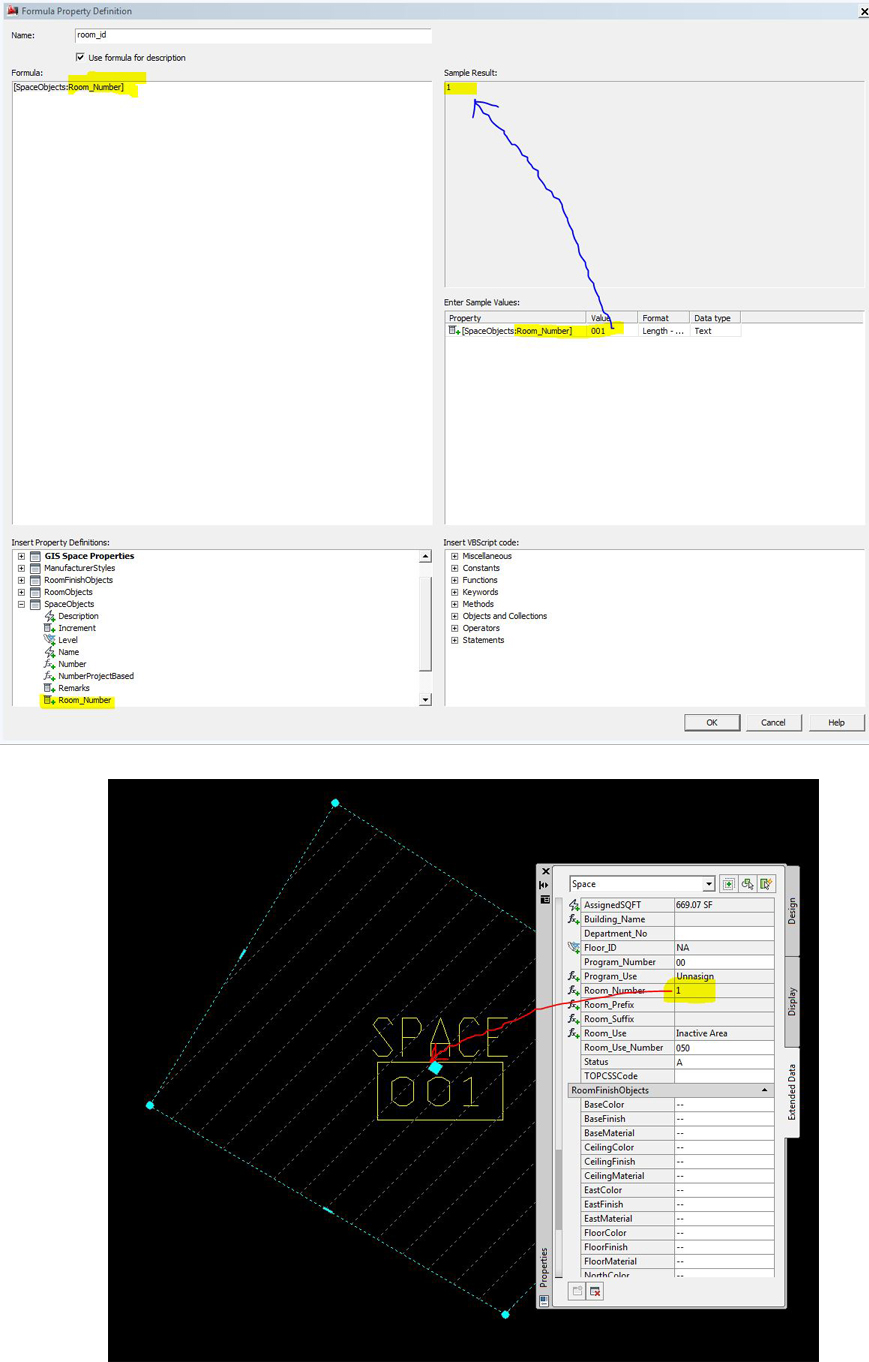
I am trying to reference my room number to another table in my project. This is to satisfy a project requirements and output to a GIS attribute table.
Originally my room number is "001" and when I reference this field to another table I get "1" and drops the first two digits. Any ideas? See attachment
Solved! Go to Solution.
Solved by David_W_Koch. Go to Solution.
2 REPLIES 2
Message 2 of 3


08-22-2012
03:11 PM
- Mark as New
- Bookmark
- Subscribe
- Mute
- Subscribe to RSS Feed
- Permalink
- Report
08-22-2012
03:11 PM
If all your formula property is doing is passing the values of the SpaceObjects:Room_Number property, you have several options:
1. Why not just use the original property?
Assuming that you have good reason not to use the original property:
2. If the formula property value still needs to be an integer, but you want the zero padding, apply the same Property Data Format that you use for the SpaceObjects:Room_Number property to the room_id formula property. You can also create a new Property Data Format or modify the one you are already using for the formula property and change the zero padding to three decimal places. Zero padding of integers is handled by Property Data Formats.
3. If the formula property value can be text, you could enclose the property reference in the formula property with double quotation marks: "[SpaceObjects:Room_Number]". That should preserve the zero padding, but you will not be able to do math with the results of the formula property.

Message 3 of 3
08-24-2012
07:41 AM
- Mark as New
- Bookmark
- Subscribe
- Mute
- Subscribe to RSS Feed
- Permalink
- Report
08-24-2012
07:41 AM
Thank you David,
It was necessary to borrow the value (in this case the room value specifically from that table). The issue is, we generated the BIM with 2 number fields. One number is from the construction documents (design drawings) and the other number is taken from the field condition, in this case the actual number on the door.
I tried the quotations and it work just fine. I thank you for your help.
alex

Reply
Topic Options
- Subscribe to RSS Feed
- Mark Topic as New
- Mark Topic as Read
- Float this Topic for Current User
- Bookmark
- Subscribe
- Printer Friendly Page